Case study · Intelligent transport
YNU Bus Tracker
A course-project idea expanded into a live campus shuttle product with shortest-route calculation, a real-time 3D city, cloud data, and an AI assistant that uses the routing engine as a tool.
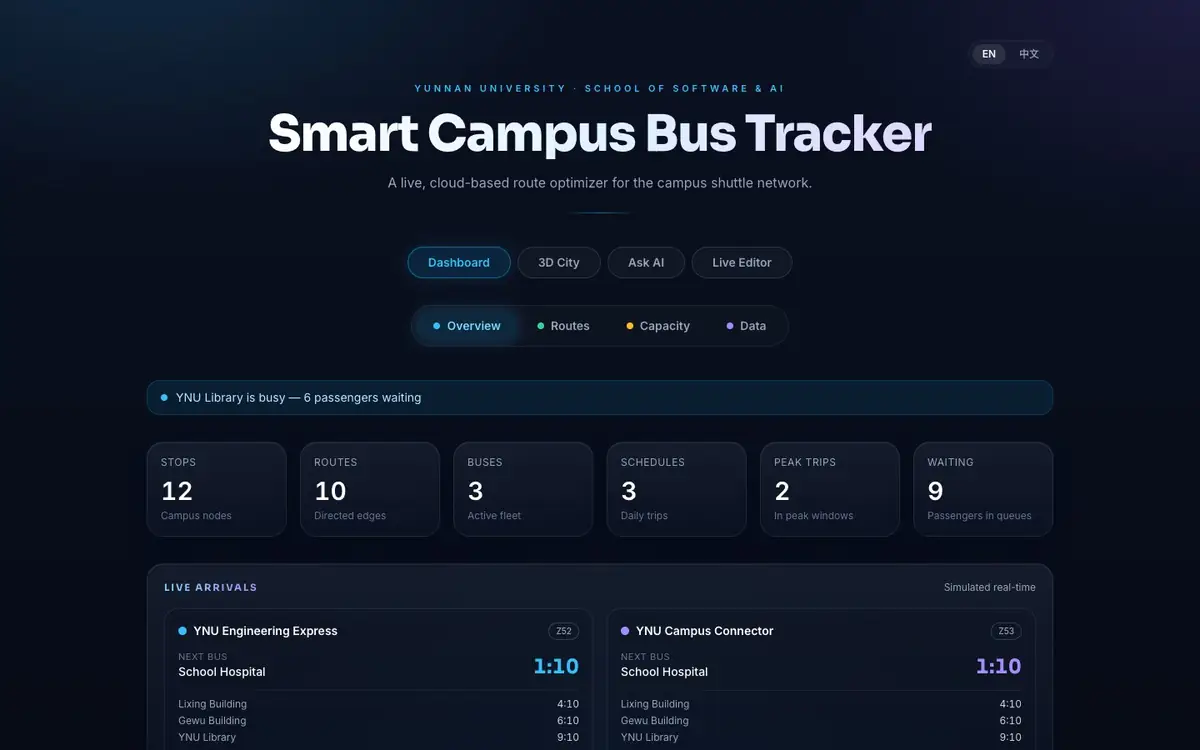
Product demo
Dashboard to AI route assistant
A concise recording of the live production interface. No passenger or administrator data is shown.
Silent interface walkthrough · 13 seconds
Interface anatomy
One dashboard, three levels of context
The product moves from system-wide network health to live service detail, then into specialized route, 3D, AI, and editing surfaces.
- 01 · PRODUCT SURFACESClear modes without hidden navigation
Dashboard, 3D City, Ask AI, and Live Editor separate distinct jobs while keeping the system coherent.
- 02 · NETWORK TELEMETRYOperational state at a glance
Stops, route edges, fleet, schedules, peak trips, and waiting counts make the network legible.
- 03 · LIVE SERVICE CONTEXTArrival information where it matters
Line-specific next-stop and ETA panels turn network data into a student-facing decision.
01 · Challenge
From algorithm exercise to usable system
The original academic problem was route optimization. A useful campus product also needed understandable trip steps, live service context, shared data, and an interface that worked for students—not just a shortest-path result in a console.
The project therefore preserves the data-structures foundation while presenting it through a bilingual, accessible web experience.
02 · Product
A complete shuttle experience
The application combines planning, visualization, operations, and assistance in one interface.
- Dijkstra route search between campus stops
- Live arrivals, ETAs, crowding, and service alerts
- Interactive Three.js city with moving buses
- Step-by-step board, ride, and alight itinerary
- Supabase realtime synchronization and admin editing
- English/Chinese UI and installable offline PWA shell
03 · Engineering
Computed answers, not invented routes
The route engine runs client-side and supplies real calculations to the interface. The AI assistant calls that same routing capability through a serverless tool, keeping travel answers grounded in the application's data. When no model key is available, a rule-based fallback still performs real route calculations.
Stack
How the AI answer stays grounded
04 · Evidence
Production-minded implementation
The public repository documents 12 campus stops, 10 directed route edges, two simulated bus lines, 501 unit tests, route calculation in under 1 ms across the documented test environment, lazy-loaded 3D code, CI/CD, accessibility landmarks, reduced-motion behavior, and offline precaching.
Explore the working system
Try route planning, inspect the live dashboard, or open the 3D City and AI assistant in the production demo.